Version Managing Files (vs. Applications)
Besides using the Version Manager to manage applications, you can also use it to version manage individual files, such as document files, spreadsheet files, PDFs, etc.
Setting up a file for version management is the same as for an application. Both require .app and .rsp files. The difference is that the Version Manager command-line parameter (defined in the .app file) specifies a file to open rather than an application. In the .app file shown below, the "Maintenance Procedures" document (Maintenance.doc) is specified and not the application executable (Word.exe).
The application used to open a file is based on the registered file type. You can view registered file types using Windows Explorer.
|
Registered File Types |

Since the version management is for a single file, the only listing in the .rsp file is that file.
|
.rsp file display |

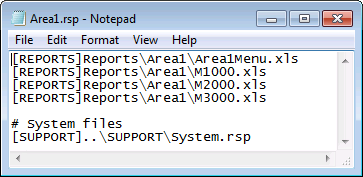
You can also use the Version Manager for groups of files. Version management will be performed on all files listed in the .rsp file; however, the only file that will be opened when the CygNet shortcut is clicked will be the file specified in the .app file.
In the example below, CygNet Excel Export was used to create three reports (M1000.xls, M2000.xls, and M3000.xls) and Excel was used to create another file with a link to all three reports (Area1Menu.xls). When the CygNet shortcut is clicked, version management is performed on all files listed in the Area1.rsp, but the file that is opened is Area1Menu.xls, since it is the file specified in the .app file.
|
File display |

|
Report display |